Pink 3D Christmas Ornaments Digital Paper
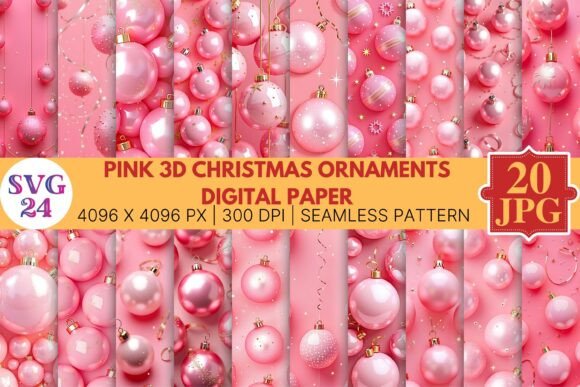
Digital assets that combine festive themes with versatile design elements open up a wide range of creative and commercial possibilities. The Pink 3D Christmas Ornaments Digital Paper set offers twenty seamless patterns in a distinctive pink palette, each rendered at 4096 x 4096 pixels with 300 dpi resolution. Understanding how to integrate such a collection into your actual workflow—whether you design professionally, run a small business, or manage content for a brand—makes the difference between a file that sits unused and one that becomes a recurring resource.
What This Digital Asset Set Offers
The set includes twenty individual JPG files, each containing a seamless pattern built around 3D Christmas ornament motifs in pink tones. Seamless means the pattern tiles without visible edges, which matters when you need to fill large areas or apply the design to surfaces where repetition is unavoidable. The 4096 x 4096 pixel dimensions give you enough resolution for both print work up to poster size and digital displays without visible pixelation. At 300 dpi, these files meet standard print production requirements, so you do not need to upscale or interpolate before sending to a printer.
Because this is a digital-only purchase, no physical goods ship. You download the files and integrate them into your own tools and processes. This eliminates shipping delays, inventory constraints, and physical storage concerns. For anyone who works across multiple projects or clients, having a ready-to-use set of coordinated patterns reduces the time spent creating original textures from scratch.
Integrating the Papers into Your Creative Workflow
Digital pattern sets fit into workflows at several points depending on what you are building. In a typical design process, you might begin with concept development, move to asset selection, then layout, refinement, and final output. The Pink 3D Christmas Ornaments Digital Paper can serve as a background layer early in the concept phase, helping you establish a color direction and mood before committing to specific typography or illustrations. Alternatively, you might bring it in during the refinement stage to replace a placeholder background with a finished pattern that matches the aesthetic.
For print-on-demand entrepreneurs, these files slot in after product selection but before mockup generation. You open the JPG, place it on your product template—whether that is a phone case, fabric panel, or greeting card—and adjust scaling and rotation to suit the product dimensions. The seamless quality ensures that the pattern covers the entire surface area evenly, which matters for products like wrapping paper rolls or fabric lengths where the design must repeat without interruption.
Bloggers and content creators often need backgrounds for social media graphics, pin images, or website headers. Using a pink ornament pattern as a backdrop for a holiday gift guide or a December newsletter header adds seasonal context without requiring custom illustration work. You can layer text and other graphic elements on top, and because the pattern is visually cohesive but not overly busy, readability stays intact.
Practical Use Cases Across Projects
The twenty-paper collection supports multiple use cases within a single project or across different projects over time. Here are several scenarios where the set fits naturally.
- Print projects: Greeting cards, gift tags, wrapping paper, party decorations, and stationery sets all benefit from a consistent pattern family. Use one pattern for the card front and a coordinating pattern for the envelope liner.
- Digital backgrounds: Video call backgrounds, desktop wallpapers, presentation slides, and social media story backgrounds can all pull from the same set, maintaining visual consistency across your online presence throughout the holiday season.
- Fashion and textile design: If you design accessories like scarves, bags, or hair accessories, the seamless pattern tiles directly onto fabric panels. The 300 dpi resolution supports commercial textile printing when paired with the correct printing service.
- Packaging and branding: Small businesses launching limited-edition holiday products can use the patterns as box liners, tissue paper designs, or product labels. The pink colorway offers a gender-neutral but festive alternative to traditional red and green.
- Scrapbooking and papercraft: Both digital and physical scrapbooking workflows benefit from the high-resolution files. Print them at home onto cardstock for handmade cards, or import them directly into digital scrapbooking software as background layers.
- Website and blog design: Use a subtle tile as a background image for your site header, sidebar, or footer during the holiday season. The seamless format ensures it renders correctly across screen sizes.
Preparing Your Files for Different Outputs
How you prepare the JPG files depends on the output medium. For digital use, you will likely need to resize or compress the image to reduce file size for faster loading. Because the original is 4096 x 4096 pixels at 300 dpi, a typical screen display requires only a fraction of that resolution. Before using the pattern on a website, duplicate the file, reduce the dimensions to 1920 x 1920 pixels, and adjust the resolution to 72 dpi. This keeps the visual quality high while keeping the file size small enough for quick loading.
For print, keep the file at its native resolution and ensure your software is set to the correct color profile. Most JPGs from digital paper sets are in sRGB, which works well for both screen and many consumer printers. If you are sending to a commercial print service, confirm whether they require CMYK conversion. Converting from sRGB to CMYK can shift pink tones toward gray or brown if not handled carefully, so always request a physical proof or soft-proof in your design application before committing to a large print run.
When tiling the pattern across a larger surface, such as a roll of wrapping paper or a fabric length, use your design software's pattern fill or tile feature rather than duplicating the image manually. Tools like Adobe Illustrator, Affinity Designer, or even Canva allow you to import the JPG and apply it as a repeating fill to a larger artboard. Because the file is already seamless, no additional alignment work is needed.
Organizing and Managing a Collection of Twenty High-Resolution Papers
A set of twenty files at nearly 12 megapixels each adds up to a significant amount of data. Before you begin using the papers, take a few minutes to set up a logical folder structure. Create a main folder labeled with the product name, then subfolders for different use cases or projects. Alternatively, tag each file with descriptive keywords in your digital asset management system or in your operating system's file metadata. This makes retrieval faster when you need a specific ornament style months later.
Renaming the files to something more descriptive than the default product code helps, too. For example, rename a file to "pink-ornament-stripes-seamless.jpg" or "3d-christmas-ball-dot-pattern.jpg" so you can search by visual attributes without opening each thumbnail. If you work with a team, establish a naming convention early so everyone uses the same terms.
- Create a parent folder: Holiday_Assets_2024
- Inside it, create subfolders: Patterns_Pink_Ornaments, Mockups, Logos, Fonts
- Inside Patterns_Pink_Ornaments, keep the original JPGs and any resized derivatives in separate subfolders: Original, Web_Resized, Print_Ready
- Add a text file or spreadsheet noting which patterns you used in which projects for future reference
This organizational approach pays off when you revisit the set for next year's holiday projects. Instead of digging through a flat folder of twenty files, you can immediately locate the exact pattern you used last time and decide whether to reuse it or choose a different one.
Quality Control and Consistency Checks
Before deploying any pattern into a client project or public-facing product, run a few checks. Open the file at 100% zoom and inspect the edges for any visible seam lines. Even seamless files can show slight intensity differences at the tile boundary depending on how your software renders them. If you see a faint line, apply a soft blur to the layer mask or use the pattern fill tool instead of placing multiple copies manually.
Check the color consistency across all twenty papers. The set is designed as a coordinated collection, but monitor calibration differences can make some patterns appear warmer or cooler than others. If you plan to use multiple patterns together in one project—for example, a catalog page featuring several products each with a different pattern—verify that they harmonize under the same lighting conditions. Adjust individual brightness or saturation in small increments if needed, but avoid heavy corrections that might degrade the JPG quality.
Test the pattern at the actual output size you intend to use. A pattern that looks balanced on a 5-inch card front may feel overwhelming on a 36-inch banner. Scale the pattern up or down in your layout software to find the visual density that works for your specific application. Because the resolution is high, you have room to scale down without losing sharpness and to scale up modestly if the pattern's scale needs to be larger.
Long-Term Value and Reusability
One of the strongest arguments for investing in a digital paper set is its reusability across multiple years and projects. Pink 3D Christmas Ornaments Digital Paper does not expire. You can use it for this year's holiday marketing, then revisit it next year for a different campaign. The pink colorway also works for non-Christmas themes such as Valentine's Day, birthday parties, or spring celebrations if you pair it with appropriate complementary elements. The ornament shapes read as festive, but the color palette gives you flexibility to reposition the set for other occasions.
Because the files are JPGs with no DRM or platform-specific restrictions, you can use them in any software that accepts image files. This includes desktop publishing applications, web design tools, video editing software, and even 3D modeling programs for texture mapping. The lack of licensing limitations for most digital paper sets means you can use them for both personal and commercial projects, though always check the specific terms from the seller to confirm.
Storing the set in multiple locations—your local drive, an external backup, and a cloud service—protects your investment. Losing a single pattern due to drive failure is frustrating, but losing an entire coordinated set is a bigger setback. A few minutes of backup organization when you first download the files saves hours of searching or repurchasing later.
Final Thoughts on Implementation
Digital pattern sets like this one are most effective when treated as part of a broader asset library rather than as one-off downloads. By integrating them into your standard design workflow, organizing them for quick access, and testing them for your specific output needs, you get consistent results without starting from scratch each time. The combination of high resolution, seamless tiling, and a coordinated color palette makes the Pink 3D Christmas Ornaments Digital Paper suitable for a wide range of print and digital applications, from small crafts to commercial packaging. Whether you are a solo creator managing your own product line or a marketing professional producing seasonal content for a brand, having a set of twenty ready-to-use patterns at your disposal simplifies execution and frees up time for higher-level creative decisions.