Creative Possibilities with the Christmas SVG Bundle 5 for Design Projects
When the holiday season approaches, designers, crafters, and business owners alike search for versatile assets that can streamline their creative workflow without sacrificing quality. The Christmas SVG Bundle 5 stands out as a comprehensive collection that bridges the gap between professional design requirements and hands-on crafting needs. This bundle offers more than just decorative files—it provides a foundation for countless applications across digital and physical media. Understanding what this collection contains and how to leverage its components can transform a simple holiday project into something truly polished and cohesive.
What the Christmas SVG Bundle 5 Delivers Out of the Box
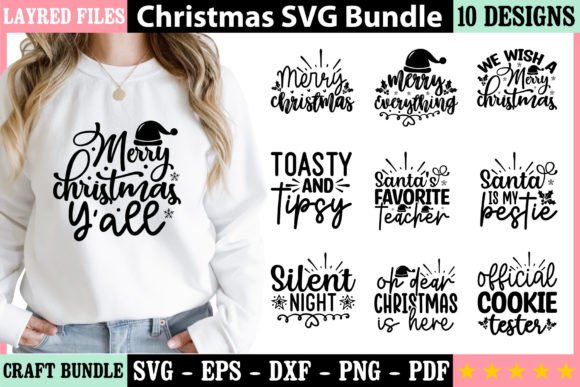
At its core, this bundle provides ten distinct designs, each available in five different file formats. The inclusion of SVG, PNG, EPS, DXF, and PDF files means that whether you work in Adobe Illustrator, Silhouette Studio, Cricut Design Space, or a standard office suite, you have a compatible format ready to use. SVG files are ideal for web and vector editing, PNG files offer immediate raster use with transparent backgrounds, EPS files suit professional print workflows, DXF files are optimized for cutting machines, and PDF files ensure universal accessibility. This variety eliminates the need to convert files manually, saving time and reducing potential quality loss.
Beyond format diversity, the technical specifications of the Christmas SVG Bundle 5 merit attention. Every file is fully vector-based, which means resizing does not degrade resolution. Whether you scale a design to fit a business card or a storefront banner, the lines remain crisp and the details stay intact. The 300 DPI resolution ensures that printed output meets commercial standards, and the CMYK color mode aligns with professional printing processes. These details matter when the final product needs to look as good in hand as it does on screen.
Understanding Vector Graphics and Their Practical Advantages
Vector graphics rely on mathematical paths rather than pixel grids, which gives them inherent flexibility. Unlike raster images that become blocky when enlarged, vectors maintain smooth curves and sharp edges at any size. For anyone who has struggled with a pixelated logo or a blurry print, this characteristic alone justifies choosing a vector-based bundle. The Christmas SVG Bundle 5 leverages this technology to ensure that each design element can be stretched, rotated, recolored, or combined without introducing artifacts.
Color changes become trivial with vector files. If a design originally features red and green but your brand palette calls for gold and navy, you can adjust hues in seconds using any vector editing software. This adaptability is particularly valuable for businesses that need to maintain consistent branding across seasonal promotions. Additionally, because vectors store color information in CMYK mode, the transition from screen to print is smoother, with fewer surprises in color matching.
For the Home Crafter and Hobbyist
Anyone who owns a cutting machine like a Cricut or Silhouette knows that the right SVG or DXF file can make or break a project. The Christmas SVG Bundle 5 provides ready-to-cut designs for ornaments, gift tags, window decals, and custom apparel. The DXF format, in particular, is widely compatible with software that controls these machines, so you can import a file and set your cutting parameters without manual tracing. For scrapbooking, card making, and vinyl projects, the PNG files offer an immediate solution for print-and-cut workflows, while the vector files allow advanced users to tweak every curve.
Hobbyists often appreciate the ability to mix and match elements from different designs within the bundle. Because all files share the same vector foundation, you can extract a single snowflake from one design and pair it with a typographic element from another, creating a unique composition that feels custom-made. This modular approach extends the value of the bundle far beyond its ten original designs.
For Small Business Owners and Entrepreneurs
Small business owners in the custom merchandise space can use the Christmas SVG Bundle 5 to create holiday-themed products without hiring a graphic designer. T-shirt designs, mugs, tote bags, and phone cases can all be decorated using the provided files. The PNG versions with transparent backgrounds are particularly useful for direct-to-garment printing or sublimation, where layering designs over different colored blanks is common. The EPS files, meanwhile, integrate seamlessly into professional layout software for catalog production or signage.
Monogramming is another area where this bundle shines. The clean vector shapes can be combined with initials or custom text to produce personalized gifts that command higher price points. Because the files are resizable, you can offer monogrammed ornaments, towels, or stationery in various sizes without needing separate artwork for each product.
For Educators and Workshop Leaders
Teachers and workshop facilitators who run holiday craft sessions can use the Christmas SVG Bundle 5 to prepare materials in advance. The PDF files serve as excellent handouts for students who may not have access to design software. The SVG files can be opened in free tools like Inkscape or Gravit Designer, making the bundle accessible even in budget-constrained environments. Demonstrating how to recolor a vector design or prepare a file for cutting provides students with transferable skills that apply well beyond the holiday season.
For Graphic Designers and Creative Professionals
Even seasoned designers find utility in a well-curated bundle. The Christmas SVG Bundle 5 can serve as a starting point for larger compositions, providing base elements that are then customized with brand-specific details. Because the files are fully editable, a designer can adjust stroke weights, modify curves, or integrate the designs into a broader illustration without starting from scratch. The 300 DPI CMYK PNG files also function well as placeholders in client mockups, saving time during the initial presentation phase.
Workflow Integration and File Management Tips
Getting the most out of the Christmas SVG Bundle 5 requires some basic organizational habits. Extracting all files into a dedicated folder on your computer, then sorting them by format, helps locate the right asset quickly. Many users benefit from creating a master library within their design software, where they can preview and import files without navigating folders manually. For teams, storing the bundle on a shared cloud drive with clear naming conventions ensures everyone accesses the same versions.
When working with the DXF files for cutting machines, it is advisable to check the file against your machine's specific requirements. Some older software versions may require minor adjustments to line thickness or layer names. The vector nature of the files makes these adjustments straightforward, but a quick test cut on scrap material can prevent wasted vinyl or cardstock. Similarly, the PNG files, while high resolution, should be tested at the intended print size to confirm that the 300 DPI meets your output device's expectations.
Color Considerations and Customization Strategies
The CMYK color mode used in the Christmas SVG Bundle 5 is optimized for offset and digital printing, but many home printers operate in RGB. If you plan to print at home, converting the files to RGB in your software may produce more vibrant results on screen and in print. For professional printing, keeping the files in CMYK ensures accurate color reproduction, especially for spot colors or Pantone matching.
Changing colors in vector files is typically a matter of selecting the elements and applying new swatches. However, some designs may contain gradients or grouped objects that require ungrouping before editing. The bundle's vector files are constructed with clean paths, so ungrouping rarely introduces unexpected results. For users new to vector editing, starting with a copy of the file ensures the original remains intact as a fallback.
Combining Bundle Designs with Other Assets
One of the less obvious strengths of the Christmas SVG Bundle 5 is how well its designs integrate with other resources. The vector files can be layered with photographs, textures, or hand-drawn elements to create hybrid compositions that feel contemporary and original. For example, pairing a classic Christmas tree SVG with a watercolor background texture yields a digital scrapbooking page that combines clean lines with artistic flair. The PNG files, with their transparent backgrounds, are particularly suited for compositing in photo editing software like Photoshop or Affinity Photo.
For business branding, the designs can be used as decorative accents on invoices, social media graphics, or email headers. Because the files are resizable, a single design can serve as both a small icon on a website and a large graphic on a storefront sign. Maintaining visual consistency across touchpoints strengthens brand recognition during the holiday season.
Printing and Production Considerations
When moving from digital files to physical products, attention to detail in the production phase ensures professional results. For vinyl decals, the SVG or DXF formats allow precise cutting around complex shapes. Weeding—the process of removing excess vinyl—is easier when designs have clear separation between elements. The Christmas SVG Bundle 5 files are constructed with weeding in mind, meaning there are no overly tight corners or floating pieces that could complicate the process.
For card making and scrapbooking, the PDF files can be printed directly onto cardstock, while the SVG files allow for scoring lines to be added for folds. The PNG files work well for digital scrapbooking or for printing on photo paper. If you plan to use the designs for sublimation, the EPS files can be opened in sublimation design software and printed onto transfer paper with ease.
Durability and Reusability Across Seasons
While the Christmas SVG Bundle 5 is themed for the holidays, many of the designs incorporate evergreen motifs like stars, snowflakes, and geometric patterns that are not exclusively seasonal. With color changes, a design featuring a star can become a year-round decorative element for branding or stationery. This reusability extends the practical lifespan of the bundle far beyond December, making it a worthwhile investment for anyone who creates content regularly.
The vector file format also ensures that designs remain usable as software evolves. Unlike proprietary file formats that may become obsolete, SVG, EPS, DXF, and PDF are industry standards with broad support. A bundle purchased today will still be accessible years from now, regardless of changes to your operating system or design tools.
Common Workflow Mistakes to Avoid
Even with a high-quality bundle, certain pitfalls can reduce efficiency. One common error is using a raster PNG for a project that requires scaling, only to find the image becomes pixelated when enlarged. Checking the intended output size before selecting a format prevents this issue. Another mistake is overlooking the DXF files when working with cutting machines, assuming that SVG alone will suffice. While many cutting programs support SVG, DXF often provides better compatibility with specific machine software.
Users who attempt to edit the PDF files directly may find that not all PDF editors handle vector paths equally. For substantial edits, it is better to open the SVG or EPS versions in a dedicated vector editor, make the changes, and then export to the desired format. This workflow preserves the original design quality and avoids unintended flattening of elements.
Why the Technical Specifications Matter in Practice
The bundle's adherence to 300 DPI and CMYK color mode may seem like technical jargon, but these specifications have real-world implications. A 300 DPI file printed at full size yields smooth gradients and sharp text, while a lower resolution file would show visible dots or blur. CMYK ensures that the reds, greens, and golds common in holiday designs print accurately, without the dulling that can occur when RGB files are converted during printing. For anyone selling products or presenting work to clients, these details contribute to a polished, professional outcome.
The vector format also affects file size positively. Vector files are typically much smaller than high-resolution raster images, making them easier to store, email, and upload. The Christmas SVG Bundle 5, despite containing fifty files total, remains compact enough to download quickly and store without consuming excessive disk space.
Adapting the Bundle for Digital and Social Media Use
Beyond physical crafting, the bundle's designs can enhance digital content. Social media graphics, blog headers, and email newsletters benefit from the clean scalability of vector files. The PNG versions, with their transparent backgrounds, can be overlaid on photos or colored backgrounds to create engaging posts without the need for complex masking. For video content, the SVG files can be animated in tools like After Effects or used as static overlays in editing software.
The EPS files are particularly useful for creating multi-page documents such as holiday catalogs or lookbooks, where consistent design elements tie the pages together visually. By using the same design motifs across digital and print channels, you create a cohesive seasonal campaign that resonates with audiences regardless of media.
In summary, the Christmas SVG Bundle 5 offers a practical and versatile foundation for a wide range of holiday design projects. Its combination of multiple file formats, vector quality, and professional color specifications makes it suitable for everyone from casual crafters to seasoned professionals. By understanding the strengths of each format and planning your workflow accordingly, you can maximize the value of this bundle and produce results that stand out during the busiest creative season of the year.