Digital Canada Day Invitation: Quick Animated Video Templates
Planning a Canada Day celebration comes with a mix of excitement and a short list of tasks. Among them, sending invitations that feel fitting for the occasion can sometimes take more time than expected. A Digital Canada Day Invitation offers a modern, efficient way to invite guests without the hassle of printing, mailing, or waiting for proofs. This type of invitation, especially in an animated video format, lets you create something personal and festive in just a few minutes.
What Makes a Digital Canada Day Invitation Different?
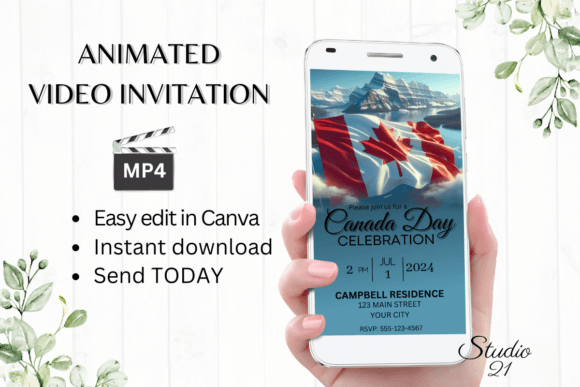
A Digital Canada Day Invitation is simply an electronic invite you edit and send online. The version discussed here is an animated video template designed for Canva, a popular free design platform. Instead of a static image or a plain text message, you get a short motion graphic with the look and feel of a Canada Day celebration — think maple leaf motifs, red and white color schemes, and gentle animations that catch the eye.
The main appeal lies in how easy it is to customize. You do not need to download any extra software or fonts. Everything happens inside Canva, which runs in your browser or mobile app. Once you purchase the template, you receive a PDF containing a link to your editable template. Open it, personalize the text, adjust colors or font styles if you like, and then download your finished invitation as an MP4 video file.
Who Benefits from This Kind of Invite
This product is designed for anyone who wants to send invitations without the usual friction. Beginners appreciate that no design skills are required. You simply click, type, and download. Busy parents planning a backyard barbecue can get invites out in under ten minutes. Small business owners hosting a Canada Day customer appreciation event can create branded invitations quickly. Freelancers, bloggers, or content creators who want to engage their audience with a festive message also find this format useful.
The template is particularly valuable for people who dislike waiting. Because you edit the file yourself, there are no proof approvals or back-and-forth emails. You see the results immediately and can make changes whenever you want. If you realize you forgot to include a potluck detail or need to update the start time, you can open the template again, fix it, and re-download the MP4. No wasted time, no extra costs.
Practical Ways to Use the Template
A Digital Canada Day Invitation works for many occasions, not just a single type of party. Here are a few realistic examples.
Family Gatherings and Backyard Parties
If you are hosting a small get-together on July 1st, an animated video invite adds a personal touch. You can include your address, the time, and a note about what guests should bring. Share the MP4 file through text, WhatsApp, or Messenger. Everyone receives a short, cheerful video that feels more engaging than a plain text message.
Community Events and Block Parties
Organizing a neighborhood celebration? Use the template to create a unified announcement. You can add details about potluck arrangements, kids' activities, or the fireworks viewing spot. The animated format helps the invitation stand out in busy group chats or community forums.
Small Business Promotions
A local café or shop hosting a Canada Day special can send this invite-style video to their email list or social media followers. Edit the text to promote a discount or a special menu item. The video format feels timely and festive without requiring a graphic designer.
Online Content and Social Media
Bloggers and creators can use the template to announce a Canada Day livestream, giveaway, or special post. Download the MP4 and share it on Instagram Stories, Facebook, or TikTok. The vertical 1080 x 1920 pixel size fits perfectly on mobile screens.
Editing Options That Give You Control
The template includes several ways to make it your own. You can personalize the text, add new lines, or delete sections you do not need. Changing the font style, color, or size is straightforward. If you want a different look, you can adjust text effects and even swap the animation style. All of these edits happen inside Canva for free after you access the template.
One useful feature is the ability to make basic changes on your smartphone. You do not need to be at a computer to adjust the wording or colors. This flexibility helps when you get a last-minute idea or need to make a quick correction while on the go.
Once you finish editing, you download the invitation as an MP4 file. This video format works on nearly every device and can be shared through most messaging apps. You can also get a shareable link to send via email. Detailed instructions guide you through each step, so even first-time Canva users will not feel lost.
What You Receive and How It Works
After purchase, you get a PDF that includes the link to your Canva template along with a user guide. The template itself is sized at 1080 x 1920 pixels, perfect for mobile viewing and social media. The guide explains how to edit, download, and share your invitation.
Because this is a digital download, nothing is shipped to you physically. You have access to the template at any time, which means you can update the invite if your plans change. Keep in mind that colors may appear slightly different depending on your screen settings and device. This is typical for any digital design product.
Important Things to Consider Before Buying
While this type of invitation is convenient, a few points are worth noting. Since it is a digital item, you will not receive a physical card. If you prefer to hand out printed invites, this format may not suit your needs. However, you could download the MP4 and take a screenshot to print, but the experience is really designed for digital sharing.
Also, editing happens through Canva. If you are completely new to the platform, the included user guide should help you get started. The learning curve is minimal, but you should be comfortable with basic computer or smartphone navigation. The template itself is easy to work with, but understanding how to access and save your edits is key.
Another consideration is file size. MP4 videos can be larger than static images, so check that your messaging app allows video attachments of that size. Most modern apps handle short video clips without issue, but it is something to keep in mind if you are sending to a group with limited data plans.
A Simple Way to Share the Spirit of Canada Day
Celebrating Canada Day often means bringing people together, whether online or in person. A Digital Canada Day Invitation in animated video format helps you do that with minimal effort. You skip the design work, avoid the wait times, and still end up with a polished invite that feels personal and festive. For anyone looking to send invitations quickly and without fuss, this template offers a practical solution that fits right into a busy schedule.