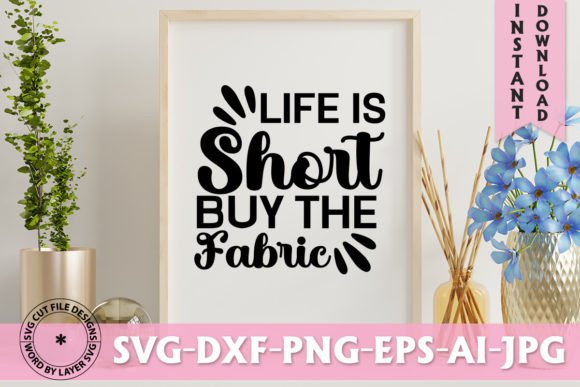
Life is Short Buy the Fabric SVG Design: A Practical Workflow Asset for Creators and Entrepreneurs
Every creative project begins with a decision. That decision might be about which phrase to use, which tool to load, or which material to cut. When you work with SVG designs, each choice affects the next step. The Life is Short Buy the Fabric SVG Design is more than a decorative file. It is a practical asset that fits into real production workflows for crafters, small business owners, educators, and content creators who need reliable, layered vector files for cutting, printing, and editing.
This design carries a direct, relatable sentiment. It works well for apparel, home décor, gift items, and branding collateral. But to get the most from it, you need to understand what is inside the download, how each file format serves a specific purpose, and how to integrate the design into your existing process without friction.
What You Actually Get in the Download
The download arrives as a single .zip file. Inside, you will find six files, each prepared for a different stage of production or editing. Knowing what each format does helps you move from purchase to finished product with minimal troubleshooting.
- SVG File (Word By Layer) – This is the primary cutting file. It is organized by layer, which means each word or element sits on its own layer. For Cricut users, this structure allows you to adjust colors, hide parts, or resize individual elements without breaking the design. Layer organization saves time when you want to customize colors for different materials.
- EPS File – Vector and editable. EPS files are useful if you work in professional design software like Adobe Illustrator or CorelDRAW. They preserve scaling and anchor points, so you can tweak curves or merge elements without losing resolution.
- PNG File (300 DPI, Transparent Background) – This is your ready-to-print or ready-to-upload raster image. At 300 DPI, it prints cleanly on fabric, paper, or transfer sheets. The transparent background means you can place it directly onto a mockup, a website, or a social media graphic without extra masking.
- DXF File – An Auto CAD vector format. While originally designed for engineering, DXF files work well with certain cutting machines and software that prefer this format over SVG. It gives you a fallback option if your platform handles DXF more reliably.
- AI File – Adobe Illustrator source file. If you use Illustrator, this is the most flexible option. You get access to the original vector paths, layers, and effects. You can modify the typography, adjust spacing, or combine it with other elements in your existing project files.
- JPEG File – A preview image. Use this for quick reference, cataloging your designs, or including in product listings. It is not intended for cutting or high-resolution print, but it helps you see what you are working with before opening the vector files.
Each file serves a specific point in your workflow. Having all six means you can move from concept to physical product without converting formats or losing quality.
Where This Design Fits in a Broader Process
A design like Life is Short Buy the Fabric is not an isolated element. It is a component that interacts with your cutting machine, your software settings, your material choices, and your end product. Understanding where it fits helps you avoid common missteps.
Before You Cut: Preparation and Planning
Before you load any material, you need to decide what you are making. Is this a shirt, a tote bag, a wall sign, or a sticker? The answer determines which file you use and how you prepare it. For fabric-based projects, the SVG or DXF file is usually the right starting point. Open it in Cricut Design Space, Silhouette Studio, or your preferred cutting software. Because the design is word-by-word layered, you can assign different colors to each word. This is useful if you want the phrase "Life is Short" in one color and "Buy the Fabric" in another, or if you want to cut each word from a different material.
If you are printing the design onto transfer paper instead of cutting it, the PNG file is your best option. At 300 DPI, it prints crisp edges and smooth gradients. Make sure your printer settings match the paper type you are using. Test on a small piece of fabric first to confirm adhesion and wash durability.
During the Cut: Usability and Material Interaction
Once your file is open and sized, you need to consider material compatibility. This design works on cotton, polyester blends, canvas, vinyl, HTV, and even paper or cardstock. The layered SVG structure helps you manage weeding. Because each word is separate, you can weed one section at a time rather than wrestling with a single large piece of vinyl. This reduces tearing and saves time, especially if you are producing multiple items.
If you use a Cricut machine, the SVG file integrates directly. You do not need to re-layer or regroup. The word-by-word structure matches how Design Space handles multi-layer projects. For Silhouette users, the SVG or DXF file works equally well. Just import, resize if needed, and set your cut lines. The design is clean enough that you should not need to simplify or clean up stray nodes.
After the Cut: Assembly and Finishing
After cutting and weeding, you move to pressing or adhering. If you used HTV, follow your material’s recommended temperature and pressure. Because the design has multiple words, you can press them individually or together, depending on your setup. Layered HTV projects often require pressing one color at a time, and the separate layers make it easy to align each piece without guesswork.
For print-and-cut workflows, the PNG file gives you a finished design that you can print directly onto printable fabric or transfer sheets. Once printed, cut around the design and apply it. The transparent background means no white border will show around the text.
How This Design Interacts with Tools, Platforms, and Methods
The Life is Short Buy the Fabric SVG Design is compatible with a wide range of tools and platforms. This compatibility matters when you work across different devices or collaborate with others.
- Cricut Design Space – Import the SVG file directly. Layers are preserved. You can change colors, hide elements, or adjust size. The word-by-word structure works well for multi-color projects.
- Silhouette Studio – Use the SVG or DXF file. The design imports cleanly. If you use the Business Edition, you can also open the EPS file.
- Adobe Illustrator – The AI file is your native option. Open it, edit the text, change fonts, or adjust kerning. You can also use the EPS or SVG file.
- Inkscape – The SVG file is fully editable. Inkscape handles layer structures well, so you can recolor or rearrange words as needed.
- Adobe Photoshop – The PNG file works directly. If you need to edit rasterized text, use the PNG. For vector editing, use the AI or EPS file.
If you sell finished products online, the PNG file is also useful for listing images. You can overlay it on a mockup photo of a shirt or bag without extra editing. This saves time when you create product listings for Etsy, Shopify, or Amazon Handmade.
Practical Implementation Tips for Smooth Integration
Getting the most from this design means integrating it into your routine with minimal friction. Here are several observations and tips based on real use cases.
Keep Your Files Organized
After unzipping, create a dedicated folder for this design. Name it clearly, for example "Life_is_Short_Fabric_SVG." Store all six files together. If you have a library of SVG designs, use consistent naming conventions so you can find the right file later. This is especially important if you build an inventory of designs for repeat sales or personal use.
Test Your Material Settings
Before cutting a full production run, test the design on a small scrap of your chosen material. Even though the SVG file is clean, your machine settings and material thickness affect cut quality. Adjust pressure and blade depth based on your specific vinyl or fabric. The layered structure means you can test one word at a time without wasting material.
Use the PNG for Quick Mockups
If you sell products online, create mockups using the PNG file. Open a photo of a blank shirt or bag, paste the PNG on top, and resize. The transparent background saves you from having to remove a white box. This speeds up your listing creation process significantly.
Customize the AI File for Branding
If you have a brand color palette or specific font preferences, open the AI file in Illustrator and adjust the text. You can change the font, resize individual words, or add a shadow effect. This turns a general design into a brand-specific asset. Once customized, export a new SVG or PNG for your cutting or printing workflow.
Batch Produce for Events or Sales
If you are preparing items for a craft fair, a pop-up shop, or a seasonal sale, batch your production. Cut multiple sheets of the same design at once. Because the SVG is layered, you can cut all the words of one color together, then switch materials for the next color. This linear approach reduces machine idle time and helps you meet deadlines.
Long-Term Usability and Quality Control
A design file is only useful if it remains accessible and usable over time. The six-file format of this download supports long-term use. The AI and EPS files are industry-standard vector formats that will open in future software versions. The SVG format is widely supported and will likely remain a standard for cutting machines. The PNG file, at 300 DPI, is high enough resolution for print use years from now.
To maintain quality control, keep a master copy of the AI or EPS file in a location that you back up regularly. If you ever need to resize the design for a new product type, open the vector file rather than scaling up the PNG. Scaling a vector file does not reduce quality, while scaling a raster PNG can introduce pixelation.
If you share the design with a colleague or hire a production assistant, send them the SVG or DXF file. These formats are reliable across different machines and software. The JPEG preview is useful for quick reference but should not be used for cutting or high-resolution printing.
Adapting the Design for Different Workflows
Not every user works the same way. Some cut fabric directly with a rotary blade. Others use print-and-cut methods. Some design digitally and outsource production. The Life is Short Buy the Fabric SVG Design adapts to each approach because of its file variety.
If you are a digital-first creator who designs patterns and uploads them to print-on-demand platforms, use the PNG file. It meets the resolution and transparency requirements of most POD services. If you are a hands-on maker who cuts HTV by hand or with a machine, the SVG or DXF file is your daily driver. If you are a teacher or content creator who demonstrates crafting techniques, the layered SVG makes it easy to show your audience how to work with multi-word designs.
For bloggers and social media managers, the PNG file works well for Pinterest pins, Instagram posts, or YouTube thumbnails. The transparent background lets you layer it over photos or brand colors without extra editing steps.
Observations on Efficiency and Consistency
Efficiency in creative work often comes down to reducing file conversions and avoiding software mismatches. This design package eliminates the need to convert formats because it includes the most common production-ready formats. You do not need to open a raster file, trace it, and clean up the vector. You start with a clean vector that is already layered.
Consistency is another benefit. Because the SVG is organized word-by-word, you can replicate the same color scheme or layout across multiple projects. If you create a series of products using different phrases, you can apply the same layer structure and color palette. This builds visual consistency across your product line without extra work.
The design itself is straightforward, which is an advantage. It does not contain overly complex details that cause weeding frustration or machine errors. The phrase is clear, the typography is readable, and the layers are logical. This reduces the learning curve for new users and speeds up production for experienced makers.
Final Thoughts on Integration
Integrating the Life is Short Buy the Fabric SVG Design into your workflow is a matter of understanding your own process and matching the right file to the right stage. Whether you are a small business owner fulfilling orders, a hobbyist making gifts, or a content creator building tutorials, the six-file package gives you options. You can cut, print, edit, or preview without switching tools or losing quality.
The design fits naturally before a project when you plan colors and materials, during a project when you cut and weed, and after a project when you assemble and sell. It interacts with Cricut, Silhouette, Illustrator, Photoshop, Inkscape, and other platforms without friction. Its layered structure supports efficiency, consistency, and quality control over time.
When you download a design that includes SVG, EPS, PNG, DXF, AI, and JPEG, you are not just buying a graphic. You are buying a flexible asset that adapts to how you work. That adaptability is what makes a design useful beyond a single project. It becomes a reliable part of your creative toolkit.